
Generating a banner with AI takes seconds. Generating your banner, the one that carries your real logo and product, holds together across fifty sizes, and clears an ad network's spec, takes an actual workflow. That gap between a banner and your banner is why so many AI-generated ads never reach a live campaign. So the real question isn't whether AI can make a banner. It's how to make banner ads with AI that stay on-brand and actually run. The fix is to split the work: an assistant like Claude handles the thinking and the volume (concepts, copy, and a variation plan), and Bannersnack handles the production (a real editor, your real brand system, and exports built to ad-network spec). AI does the thinking, you keep control, and the output runs. There are two ways to run this. If you need a handful of banners, you work by hand in the Bannersnack editor. If you're producing at volume, or embedding design into your own product, the Enterprise API turns the same workflow into a pipeline, with Claude wiring the integration. Either way, every ad in the set stays yours to direct.
Key Takeaways
Making banner ads with AI works best as a two-role split. An assistant like Claude brings the volume, drafting concepts, copy, and variation plans, while Bannersnack keeps you in control of every ad and produces the on-brand, servable export.
Generating a banner with AI is quick, but a usable ad also has to stay on-brand, use your real product images, fit every placement size, and meet ad-network spec. Raw AI output usually misses those, which is why the servable, compliant ad comes from Bannersnack.
Bannersnack's Smart Resize adapts one design across 50+ sizes. Your Brand Assets hold the logo, colors, and fonts you upload, and Brand Fetching can also pull them from your site, so every variant stays on-brand.
The Bannersnack Enterprise API embeds the editor under your own brand and manages users, banners, and exports through a secure connection on the Enterprise plan. There is no official Claude connector, so Claude builds the integration itself, as custom code or through an automation bridge.
Once the pipeline runs, the Design Generator spins up size and message variants, built-in translation localizes copy into 100+ languages, and A/B tests report views, clicks, and CTR in Bannersnack's analytics. Every variant inherits the same brand assets, so consistency holds without a redesign.
In the pipeline, people design in the editor, the API provisions and exports, and Claude reasons and wires it together. Every set Claude builds stays a live, editable banner set rather than a flat file.
What does “making banner ads with AI” actually mean?
Making banner ads with AI means using an AI assistant for the parts it's good at, then a production tool for the parts it isn't. The assistant drafts concepts, copy, and variations; the production tool turns those into finished, on-brand, servable ads. The label covers two roles, not one button.
That difference matters because “type a prompt, get a banner” hides where the work really is. An assistant can generate ten headline options and a plan for eight sizes in seconds. It cannot guarantee your exact logo, your real product photo, and a file that clears an ad network's spec. Those belong to the production step.
Use Case | Claude | Bannersnack |
|---|---|---|
Its job | The thinking and the volume | Control and compliant export |
What it produces | Concepts, copy, and content variations | On-brand banners, resized across 50+ sizes |
Where it's strong | Fast, on-brief drafts | Smart Resize, brand consistency, and servable output |
Which lane is yours?
If you need a few banners for one campaign, work directly in the Bannersnack editor.
If you're producing across many products, languages, and placements, or embedding design into your own app, the Enterprise API is the path.
Either way, the work stays in your hands. The assistant takes on the repetitive volume, and you keep the calls that shape the brand. You can run the whole thing on a small scale first, by hand in the editor, then expand into the pipeline once it fits how you work.
The two-part workflow: Claude for volume, Bannersnack for control
The two roles are simple. Claude brings the volume, driving the work at scale. Bannersnack keeps you in control of every single ad and handles the exports that pass ad-network spec. Running the two together uses a Bannersnack API account, with your reusable templates living in your Bannersnack account for the integration to drive. Here is how it fits together, using one running example: an ecommerce retailer turning a product feed into a full display campaign.
If you prefer to take this in as a video, we build the whole workflow end to end, integration included, in a short walkthrough:
1. Build a reusable template in your account
Lay out one banner and use Smart Resize to adapt it across your placement sizes (300x250, 728x90, 160x600, 320x50 for display, plus a square for Meta): one design adapts to 50+ sizes.
Stock it from your Brand Assets, where your logo, colors, fonts, and product images live. You upload them there, and Bannersnack's Brand Fetching can also pull your logo, colors, and fonts straight from your site. The brand system lives in the template, so changing an element once updates it across every size at once.
2. Hand Claude the volume
You set up the integration once, and it takes no developer and no sprint: you point Claude at Bannersnack's API documentation and it builds it (more on that below). Then point Claude at a source, a product feed, a set of target languages, or a landing-page URL, and it reads your existing sets, picks the template, and populates it, swapping each product's copy and image, or each language's translated copy, into its own on-brand set.
It keeps copy tight and within the roughly 20 to 25 percent text guideline (Predis.ai, ImagineArt, 2025) so it fits the layout, with one clear CTA per banner.
3. Keep control of every ad
Every set Claude builds lands in your account as a live, editable banner set, not a flat file. Open any single size and adjust what automated population can't judge: a headline that wrapped, or a product that needs repositioning. A person still decides what good looks like.
4. Export in compliant formats
Export the whole lineup at once, HTML5 for the ad platforms or MP4 for social, each within ad-network spec, then serve it with AdTag. If you only need a handful of banners, you can do all of this by hand in the editor and skip the integration entirely.

How do you make banner ads using Claude?
Claude is strong at the reasoning and drafting layer: it plans concepts, writes copy, and maps out the variations to run. What it hands you is a strong starting point, not a finished, spec-compliant ad. Turning that into an on-brand HTML5 banner that meets ad-network requirements is Bannersnack's job.
a. Concepts, copy, and variation planning
Ask Claude for a variation matrix tied to your placements: which message goes in which size, which flavor of CTA. Ask for copy that respects the 20 to 25 percent text guideline and keeps one CTA per banner, since a single clear action beats a crowded frame.
You get a structured plan you can hand straight to the build step, rather than a pile of loose ideas.
b. Where Bannersnack takes over
Claude's output, whether copy or a variation plan, is a draft, not a servable ad. Ad networks enforce real constraints on file size, animation, and click tracking, and raw AI output tends to fall outside them.
Can Claude hand you the finished banner? Not the one that runs: it drafts and plans, and Bannersnack turns that into an on-brand, in-spec, servable ad. That handoff is what the two-role split is built around.
Where does AI banner output fall short?
Raw AI banner output tends to fail in three predictable ways, and naming them is what makes the production step worth doing:
First, it drifts off-brand. An image model can catch a rough vibe and a color or two, but it won't hold your exact logo, type, and spacing across dozens of variations. By the tenth banner you can be looking at a slightly different brand each time.
Second, it gives you a stand-in rather than your actual product. An image generator produces a likeness of what you sell, not your real product photography, and for a product ad that gap matters.
Third, it hands you a flat picture, not an ad. A PNG is not a sized, clickable, trackable, spec-compliant unit that an ad network will serve. That gap between image and ad is exactly what the next step closes.
How do you make an AI banner launch-ready?
To make an AI banner launch-ready, you export it as HTML5 within the ad network's limits, serve it with AdTag, make it clickable and trackable with ClickTag, and keep it human-controlled with your real product images.
Bannersnack exports to JPG, PNG, GIF, MP4, HTML5, AMPHTML, and PDF, so the format your placement needs is covered.
1. Export to HTML5 within the 150KB and 30-second limits
For the Google Display Network, an HTML5 banner should stay under 150KB, with any animation capped at 30 seconds (Google Ads, 2026; confirm current limits before you ship).
Bannersnack's Magic Animator builds that motion, and the quality slider lets you trim file size when a design runs heavy. AMPHTML is a lighter export when a placement calls for it, and the full set (JPG, PNG, GIF, MP4, HTML5, AMPHTML, PDF) means you match the file to the placement instead of forcing one format everywhere.
2. Serve with AdTag, track clicks with ClickTag
AdTag is the part that serves your HTML5 banners. It delivers them across 26+ ad networks, including DSPs like Display & Video 360 and The Trade Desk, and bypasses the 150KB limit, so a heavier, richer creative still runs.
ClickTag is separate, and it handles click tracking: it makes the whole banner clickable and lets you swap the landing-page URL across a campaign without editing the design. One serves the ad, the other tracks the click.
3. Keep it human-controlled with real product images
Because you design with your own uploads, every banner shows your actual product and matches your real brand system. A designer directs the output and AI drafts it, which is the reverse of the prompt-and-hope approach. That control is the whole point of working this way.
Connecting Claude to Bannersnack at scale with the Enterprise API
At scale, the connection between Claude and Bannersnack runs through the Bannersnack Enterprise API: a way to embed the Bannersnack editor inside your own product, under your own brand, and manage users, banners, and exports programmatically.
There's no official Claude connector today, so the link is custom code that Claude helps write and operate, or an automation bridge. The honest division holds: people design in the editor, the API provisions and exports, and Claude reasons and wires it together. It does not render the design.
In the walkthrough linked above, this same integration drives three different jobs from one setup:
a full product catalog built from a feed,
a campaign localized into several languages,
and a social ad generated from a listing URL.
What the Bannersnack Enterprise API does
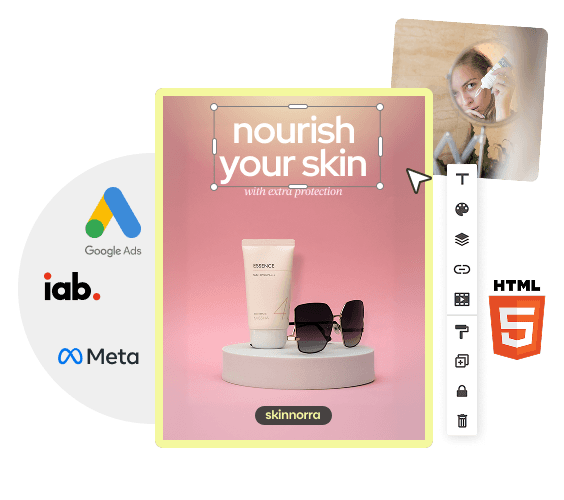
The Enterprise API is a white-label embed plus a management layer. You embed the Bannersnack editor on your own domain, under your own brand, and drive it through a secure, authenticated connection. Access comes with the Enterprise plan: Bannersnack sets up the account with you and issues the credentials. Everything stays hosted on Bannersnack servers, so there is no platform of your own to build or maintain.
Where Claude fits in the integration
Building the integration normally means a developer and a sprint. Here it takes neither: you point Claude at Bannersnack's API documentation and it does the work a developer would, reading the docs and wiring up the connection. From there it can:
open editors,
list your banner sets,
trigger exports on your behalf,
and repeat all of that across a large batch.
One habit worth expecting: a careful assistant won't accept a secret key pasted into a chat and will steer it somewhere safer instead. Upstream, Claude is still doing the creative thinking from the earlier steps. Because there's no official connector, this runs as custom code Claude writes against the API, or through an automation bridge; confirm any specific bridge (such as Zapier or Make) before you rely on it.
Human-designed and API-served
People design in the embedded editor while the API provisions accounts, lists and clones sets, and exports files. Claude reasons about the job and writes the integration (it never renders the banner itself).
One security note: keep your API credentials out of chats and shared code, and let the integration handle them over a secure connection.
How do you scale and test on-brand variants?
Once the pipeline runs, it produces variants, localized sets, and test candidates on demand, all from the same on-brand main design. This is the payoff: more output without more drift.
Use Smart Resize and the Design Generator to spin up size and message variants from one layout. Localize copy with built-in translation into 100+ languages, so a single campaign can ship in several markets without a redesign; the video's localization job does exactly this, cloning one set into four languages across every size.
Run A/B variants and read views, clicks, and CTR in Bannersnack's built-in analytics, then keep what performs. Through all of it, brand consistency holds because every variant inherits the same real assets rather than being regenerated from scratch.
Conclusion
Making banner ads with AI works best as a two-role job. Claude brings the volume and Bannersnack keeps you in control of every single ad and handles the exports that pass ad-network spec; and the Enterprise API scales that from one template into a full pipeline. You get the speed AI is good at without giving up control of a single ad.
If you're making a handful of banners, open the editor and start designing. If you're weighing an automated pipeline for a team or a product, talk to the team about the Enterprise API. Either way, the output stays yours to direct.
P.S. The unglamorous part of this workflow is the middle: opening each size, fixing a headline that wrapped, nudging a product back into frame.
It can look like busywork, but it's where a person decides what good looks like, and it's the part worth keeping human. Claude gets you there faster. The call stays yours.